
GTA 5 Enhanced Outfit Editor: A Complete Guide to Customizing Characters
Introduction
In GTA 5, one of the primary ways for players to customize their characters in Los Santos are through various customizations. Using the GTA 5 Enhanced Outfit Editor will give players the greatest flexibility possible in terms of creating and changing outfits. With limitless combination possibilities and full control over every element of your character’s look, you can create the ideal look for your role-play personas or simply enhance your character’s overall visual appeal. The Enhanced Outfit Editor will forever alter how players create and customize their characters’ appearances in GTA 5.
What is the Enhanced Outfit Editor?
A high-end modding program, the GTA 5 Enhanced Outfit Editor was made to build on the native clothing customization in GTA 5. In contrast to GTA 5’s built-in wardrobe system where there are pre-determined combinations, limits, etc., this enhanced edition offers endless freedom for players to combine clothing parts without any limits. A real-time customization tool for your characters as well as a long-term outfit manager, this tool gives players the option to permanently save many complete outfits and switch between those outfits quickly.
Years of work from the community developing the tool has given rise to the Enhanced Outfit Editor which contains feedback from devoted fans as well as solutions to limitations contained in the base game’s clothing mechanisms. Utilizing superior scripting and direct manipulation of the game’s state, the Enhanced Outfit Editor supplies abilities beyond what may be achieved using common gaming practices.
Key Features/Capabilities of the Enhanced Outfit Editor
Endless Possibilities for Creating Outfits
The main power of the Enhanced Outfit Editor is that it provides infinite possibilities for combining outfits that are otherwise prevented by technical constraints of the original game. Users have the capacity to combine pieces of clothing that would be mutually exclusive under normal circumstances; thus they are able to break through the limitations imposed by the game on typical play. This creates limitless possibilities for creative self-expression that were previously unachievable within the parameters of GTA V.
Total Component Control
For each visually observable component of your character, the Enhanced Outfit Editor also affords total control:
* All facial attributes (beard type/styles, face hair length/length variation, eyes)
* Full selection of hairstyles along with color options
* Upper body clothing elements from each clothing type in the game.
* Pants, short pants/shorts, and lower body elements
* Footwear choices from all available shoe types
* Accessories such as hats/masks/glasses/jewelry, etc.
* Hand-held objects/gloves
* Decals/patterns/textures
* Inner collar shirts/upper-shirt variations
Long-Term Multi-Profile Outfit Manager
Unlike other tools that require users to maintain just one outfit at a time, the Enhanced Outfit Editor permits users to generate and retain numerous stored outfit profiles. These saved outfits can then be managed easily via a systematic organization of the saved outfits. The system will manage your outfit files and meta-data for you so that your carefully created outfits will continue to exist even after you reboot the game and will be accessible whenever you want them.
Instant Real-Time Outfit Swapping
Another very important feature is instant swapping of saved outfits without having to go to the wardrobe and do an outfit change animation. For role-playing purposes, for making content, or for simply trying out different styles during gameplay, this capability is incredibly useful.
Export Ability
Normally, the Enhanced Outfit Editor comes equipped with exporting capabilities so that you can send your outfits to your buddies or the community. Thus, this tool encourages collaboration among GTA V modders by allowing fashion experts to find outfits created by other talented design experts and use them themselves.
Enhanced Advanced Slot Locking
More advanced users can utilize slot-locking functions that allow certain aspects of clothing to stay intact while applying another outfit. Therefore, if you spend hours choosing a hairstyle or accessories for example and decide to apply another outfit; instead of losing your selected items completely, you will only lose some items.
What is the GTA V Outfit Editor Tool?
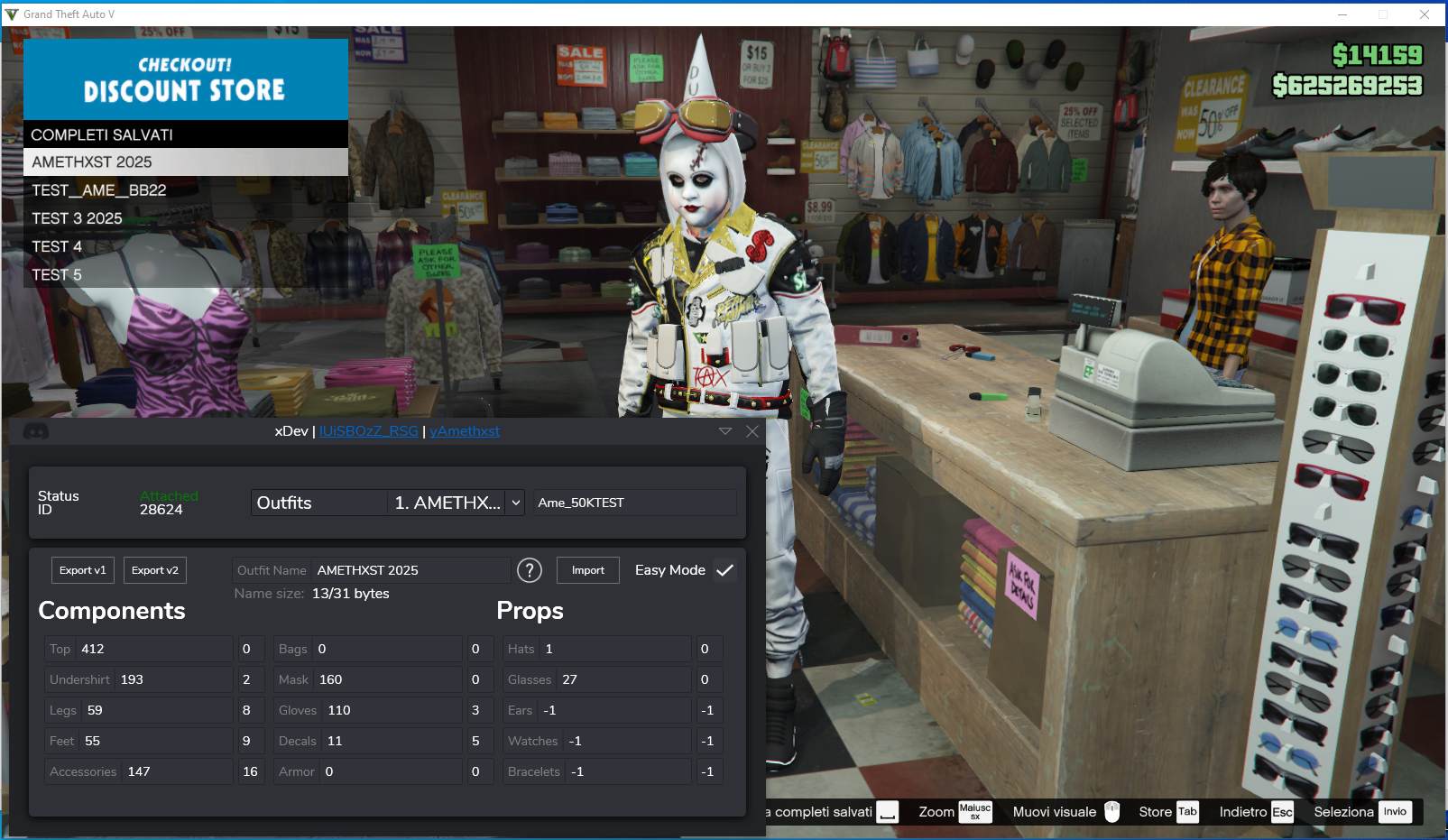
GTA V Outfit Editor (also known as Outfit Editor) is open-source external tool for GTA V Online; it allows you to edit your outfits. In this version we have just restored the “bracelets” field to the original one.
In essence, Outfit Editor was created for players who would like to have more options in how they combine clothing items in GTA V Online. Using an Outfit Editor is simpler to assemble your outfits instead of manually trying all possible combinations and constantly changing different fields.
It may be especially helpful for players who often experiment with various combinations, but are very difficult or too time consuming to repeat via usual gameplay menu.
General Idea:
Select or specify the clothing parts you wish to use, organize the outfit and then provide data needed to replicate this configuration within a compatible outfit-configuration workflow.
Regularly creating multiple custom outfits for GTA V Online will save you a lot of time. Instead of dealing with every single outfit as a totally manual task, the editor offers you a more practical option for managing your outfit configuration.
What Is BBOB?
BBOB is the short form of a browser-based extension related to the bincohax workflow for creating outfits. The extension is described on Chrome Web Store as “BBOB gta online outfits builder” and developed by BBFAS. According to the description of this extension provided by BBFAS, it is a chromium extension for creating GTA Online outfits and generating an outfit code for bincohax or the BBFAS Outfit Editor.
The browser extension is useful since it has shifted some of the work involved with creating outfits into the browser. Unlike manually transcribing your chosen outfit selection into a valid code format, BBOB generates the code for you automatically.
According to information in Chrome Web Store regarding BBOB v. 0.0.0.2, the last update date was Feb. 23, 2024.
How Does BBOB Work?
BBOB works as a link between the creation of an outfit and the output of an outfit code.
Typical usage of BBOB includes creating/configuring an outfit via a supported editor, selecting your preferred clothing parts, and then applying BBOB to create an applicable outfit code. That code can be used afterwards in conjunction with other tools that support these types of workflows, including bincohax or the BBFAS Outfit Editor.
This greatly reduces complexity for users who build many outfits. Users no longer need to keep track manually of individual component values and convert them into a code format. BBOB takes care of formatting required by the compatible workflow.
As well as being quite lightweight, the extension has a very low footprint. Store tracking indicates that BBOB has a package size around 42KB. Permissions included are storage and access tied to website functions that BBOB supports.
Why Do I Need an Outfit Code Generator?
Organization is probably the most obvious advantage of an outfit-code generator.
You can easily get lost in what individual clothing parts were selected for a specific combination when testing out new GTA Online clothing. An outfit code represents the configuration in a very compact manner, providing you with an easy means to save, copy and reuse an outfit.
Creating outfit showcases or maintaining large collections of custom outfits can benefit from this as well. A number of configurations can be prepared and saved without needing to rebuild each outfit individually again.
Therefore, BBOB is more about streamlining the creation and transfer of outfit configurations rather than altering the look of the game itself.
Using BBOB with Bincohax
Bincohax is crucial in supporting BBOB as it is designed to produce codes compatible with it. Both Bincohax and BBFAS Outfit Editor are explicitly mentioned in the published description of BBOB as supported destinations for its generated outfit codes.
Conceptually:
Build the outfit → Generate the code with BBOB → Apply the code to the compatible outfit editor.
This gives users a much easier route to move their custom outfit configuration into the editing workflow.
Availability in Browser Extensions
BBOB is available in Microsoft Edge Add-ons platform as a chromium based extension. The listing mentions BBFAS as the developer/publisher of BBOB, and according to current information shows 4.8/5 stars from 4 reviews.
Because browser extensions can interact with websites, users should generally check permissions and origin of installed extensions before doing so. As third party extensions typically suggest, users should exercise common sense in regards to installation of extensions; especially those that inject scripts into websites.
🧩 Picture :
🎬 Video Tutorial
