

Introduction to the GTA 5 Saved Json Vehicle Collection
Customization of vehicles is arguably the most creative feature within the GTA 5 video game. It allows users to customize the appearance and functionality of their vehicles in addition to personalizing them. Users who create hundreds of customizations for their vehicles are required to spend hours experimenting and developing knowledge about automobile design. The Saved Json Vehicle Collection is a groundbreaking tool for the GTA 5 modding community; it is a large database of 925 pre-customized vehicle files which include 406 different vehicle models. This database will give gamers fast access to numerous custom-made vehicles saving users hours of tedious tuning, provide examples of how to configure other vehicles in your collection and supply a total solution for all types of vehicle enthusiasts.
What is the GTA 5 Saved Json Vehicle Collection?
GTA 5 Saved Json Vehicle Collection is a huge library of vehicle configuration files which contain customization information for each vehicle in GTA 5 using json files. There is a variety of customization choices available for each vehicle such as: performance modification, exterior/interior modifications, paint schemes/wheel options/livery options/neon configurations/audio settings etc… Unlike having to tune each vehicle via game menus, users can simply select a predefined configuration for their vehicle(s) thus transforming them into fully customized versions of themselves.
GTA 5 Saved Json Vehicle Collection represents what is possible when the GTA V mod platform is combined with the passion and creativity of the gaming community. As previously stated, there are over 925 individual configuration files included in the collection which represent over 406 different vehicle models (many of which have several configuration variants). Therefore, the GTA 5 Saved Json Vehicle Collection contains a range of templates for players that vary from simple realistic customizations to aggressive high performance builds and even fantasy based vehicle creations.
Scope/Scale of the Collection
Extensive coverage of all GTA 5 vehicles
The collection contains a total of 406 unique vehicle models from the entire list of automobiles available in GTA V. Some examples of vehicle models contained in this collection include: sports cars/supercars/motorcycles/trucks/SUVs/military/emergency service/specialty aircraft. Many popular vehicles have additional configurations included for example; the 10F model includes standard/base, wide body and several custom configurations so players may test out the different tuning philosophies that they could use on the same car.
Multiple customization configurations for each vehicle
The 925 separate files in this collection demonstrate a vast array of different ways to customize your vehicle.
Some examples of some of these customization styles include:
– High performance builds designed for maximizing both speed and handling.
– Designs centered around aesthetics that emphasize the visual qualities of your vehicle.
– Luxury designs that utilize premium paints/materials/colors.
– Street racing designs that focus on extreme engine/exhaust/tire/suspension modifications.
– Off-road capable designs.
– Liveries and themes that allow role-playing by players.
– Recreations of themed vehicles based on real world models.
– Unusual/fantasy designs that showcase what is possible with vehicle creation.
With a collection like this, no matter if you want to build a realistic daily driver, an ultra-fast street racing machine or just a show-stopping eye catcher this collection offers many options.
Notable Vehicle Models in the collection supercars and high-Performance Vehicles
A large number of versions of many high-end Cars available in gta v have been added to the collection. Examples include the Pegassi Infernus, grotti turismo r, Coil Voltic, Progen T20, Progen Emerus, pfister 811 and Vapid GB200. Each model has several unique version variations; some emphasize very minor Performance improvements while others are fully built-out for Racing.
Sports Cars
Each Sports car enthusiast will find an abundance of customization options available for each of the following models: Annis S80RR, Dinka Blista Compact, Bravado Buffalo, Obey Omnis, Grotti Bestia GTS, Dinka Double-T and dozens more. Each vehicle has at least two ways to configure.
Motorcycles
Variations of motorcycles range from cruisers to street bikes and high-Performance machines such as the bati 801, Bati 801RR, Shitzu Bagger, Nagasaki Chimera and many more. Configurations of motorcycles vary depending on whether they were designed around aggressive riding style, aesthetics or both.
Trucks and utility Vehicles
Heavy-duty trucks and utility trucks have configuration options suited for roleplaying purposes, off-roading or working. Trucks used for work, tractor trailers and special purpose utility Vehicles are examples of heavy-duty trucks.
Military and combat Vehicles
Combat Vehicles, armored personnel carriers and helicopters are configured with a focus on durability and tactical capabilities.
Specialty and Emergency Vehicles
Police Vehicles, ambulances, fire trucks and security Vehicles have configurations that are typical of roleplay Vehicles and Emergency services simulation Vehicles.
Key Features and how it was implemented instant configuration
Instead of having to adjust over 30 individual settings manually, the player can simply open a json configuration file and load a pre-built package of settings. The entire build is loaded into the game immediately.
Configuration Templates/preset options
For people who do not know anything about designing Cars, these files offer inspiration and ideas for building configurations. People new to car designing may see how established designers choose to optimize certain aspects of different car designs.
Modular design for customization
Because the json design allows for easy changes, players can load a pre-configured setup and then personalize it to meet their needs. Players can also start with community-made setups and modify them to fit their own desires.
Reliable consistent output
The output of community-designed configurations ensures that Cars look good and perform well. They are not haphazardly combined like someone randomly selecting components from a parts bin. Instead, the community configurations represent thoughtful applications of automotive design principles to the gta v platform.
Support for roleplayers
Roleplayers’ communities often utilize the same pre-vehicle builds when creating characters, establishing factions, etc. So that there is Consistency among factions and npcs in terms of what Vehicles they drive.
How to install the collection installation setup
1. Unzip the json files to the correct location for your gta v mod manager to recognize (most commonly saved_json_vehicles/ within your mod script folder).
2. Access your Vehicles
Most mod managers come with vehicle spawn menus that will automatically locate any saved json configs. Go to your vehicle menu and find the vehicle you wish to spawn. Click on the exact config variation you would like to spawn.
3. Applying customizations
When you spawn a preset vehicle, most mods will read the json file(s) associated with that vehicle and apply all stored customizations (colors, upgrades, etc.) to that vehicle. In just a few seconds your vehicle should be completely customized in game.
4. Additional personalization
Once you’ve spawned one of our preset Vehicles, you’re free to modify it however you’d like using in-game customization menus. Our presets are meant to act as a base point for your own customization choices.
5. Sharing and distributing
Json makes it very simple to share files with other users. Users can export their customized vehicle configurations and share them with fellow players or post them online for other players to download.
Benefits for different user groups content creators
Gta v streamers and YouTubers can use these preset Vehicles to create content with consistently professional-looking customizations without wasting hours tweaking every single vehicle. With these presets, creators can focus on gameplay/narrative instead of constantly navigating through vehicle menus.
Roleplayers
Roleplayer server administrators can easily standardize NPC fleets and keep vehicle liveries/fleet styling consistent throughout the server. Additionally, this helps enhance immersion and maintain a sense of community identity.
Casual players
Casual players looking to quickly get access to customizable Vehicles without requiring advanced customization skills themselves enjoy being able to instantly apply expert-level builds. This provides casual players with greater variety in gameplay without needing automotive design experience themselves.
Car enthusiasts
Car enthusiasts interested in car customizing can study these builds to gain insights into how to effectively design elements such as Color combinations, upgrade paths, etc. These builds serve as reference materials and sources of inspiration for enthusiasts alike.
Competitors/racers
Racing/competitive teams enjoy utilizing configurations optimized for Performance. This allows competitors/racers to focus on developing their driving skills versus tedious vehicle tweaking processes in game.
Collectors
Collectors pursuing complete sets of all Vehicles available in gta v can use these presets to populate their garage with hundreds of varied, expertly customized Vehicles spanning the full breadth of GTA V’s automotive library
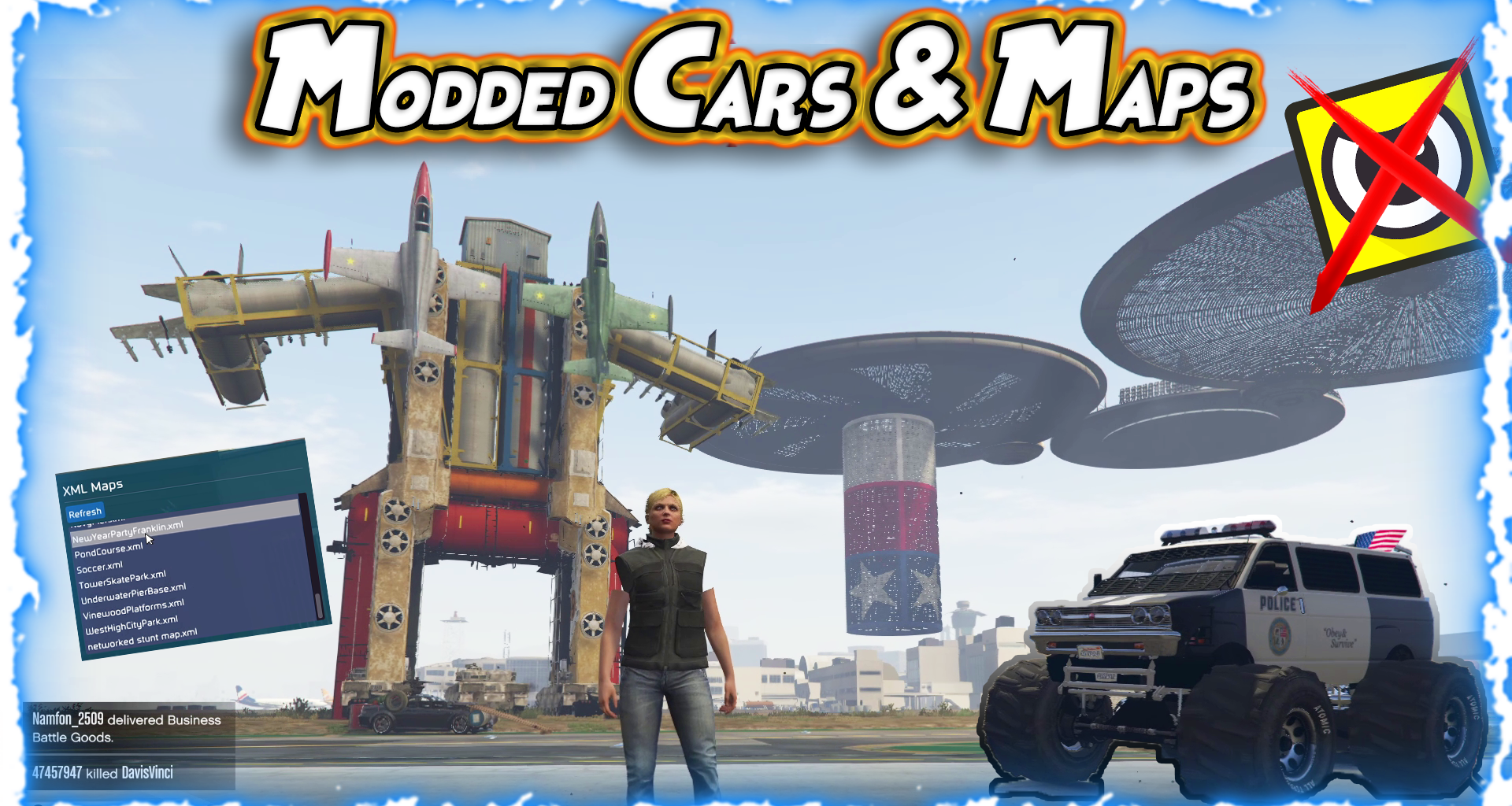
Modded Vehicles Script:
One of the main focuses of users of the Yim Menu v2 is the impressive variety of modded vehicles available. As players use the same set of vehicles provided by rockstar in the standard version of GTA Online, with customization options available at Los Santos Customs, modded vehicles create a completely different world of possibilities. With mod menus such as the yim menu, users have access to spawn vehicles that defy the normal physics of the game. For example, hypercars could accelerate faster than possible, heavy armor trucks with built-in tanks, and even vehicles created with fully custom 3D models and texture designs made by the Community that do not exist in the base game’s files.
Mod vehicle files are generally shared among members of the modding Community as raw data file formats (for example, .json) – once imported into the correct directories of the yim menu’s repository, all a user needs to do is run one of those file lists and their entire collection of custom vehicles will immediately be added to the game. Thus, what was initially a routine drive down the coast or a simple street race now becomes something extremely wild and unpredictable giving veterans of the game a whole new way to enjoy the game.
Spooners and Custom Maps
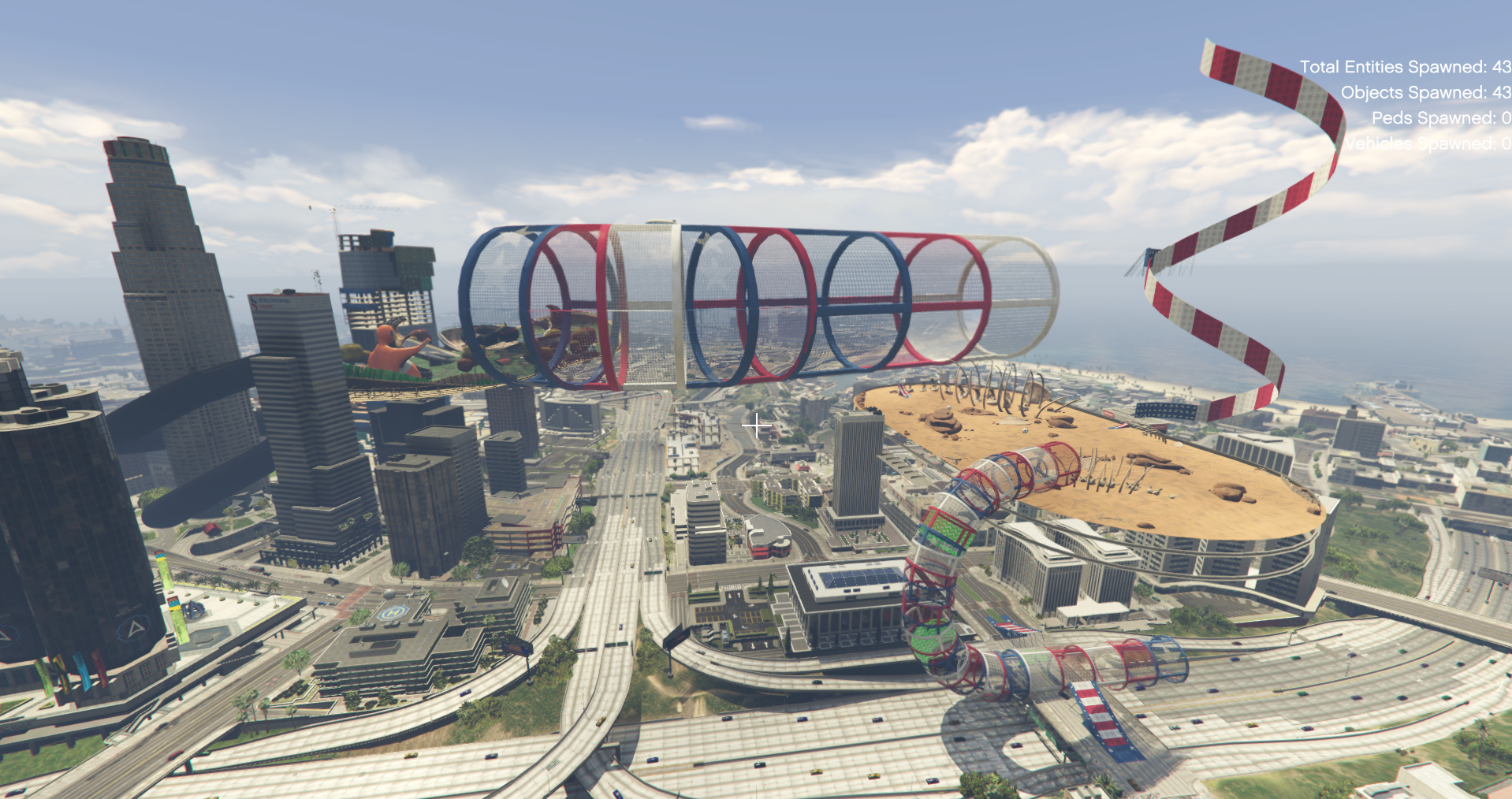
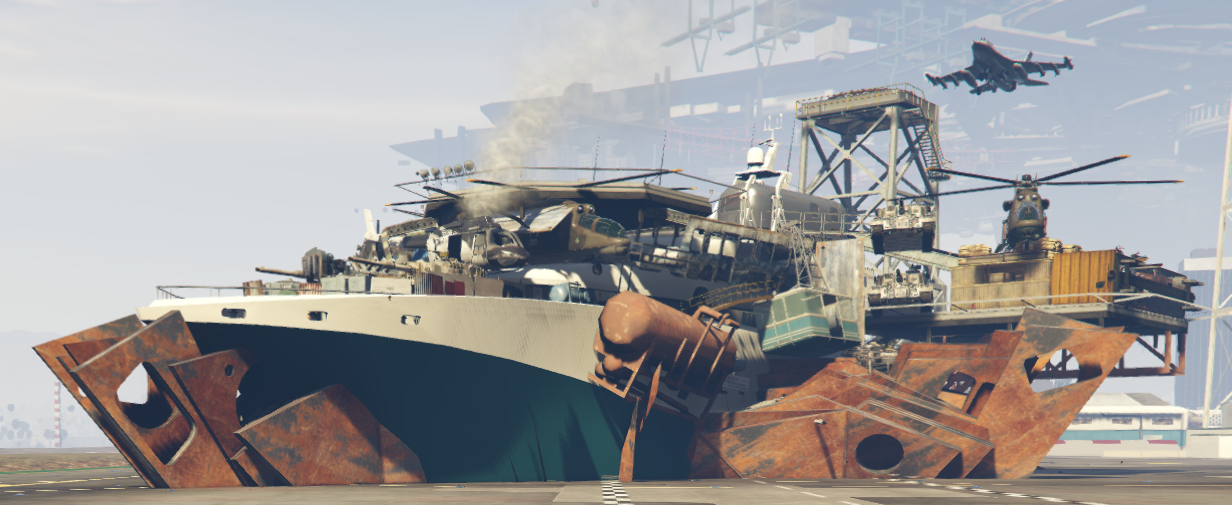
In addition to adding vehicles to your game world, there is another aspect to creating custom content in GTA Online, using “Spooner Placements” – and that is when you see the pure creativity of the modding Community really shine through. Users create these custom placements by using detailed XML files that contain the structure, obstacles, and map layout needed for custom placement. The potential for creativity here is endless – for example, users have been able to develop very detailed XML files that would allow a user to create a custom location called an “airport skatepark.” when the user runs this XML file via the menu, the flat empty asphalt of los santos international airport is instantly converted into a skate park filled with half pipes, grind rails and large ramps perfect for BMX & skateboard mods.
There are also many other examples of great XML files that allow users to create Custom Maps including: city course maps containing tight chicanes and stunt tubes for high stakes street racing; Car Show maps that provide custom lighting and show plates to display the car; and City Derby maps where users can crash their modded vehicles into each other. Like the previous example of custom placing vehicles into the world of GTA Online, XML files instruct the game engine what objects to spawn, where to place them to the exact x,y,Z coordinate of placement and how they will act as if users were building their own game mode.
How it works: a look at the code behind the mods.
Using mods in GTA Online may appear as though magic occurs on-screen but behind-the-scenes it is actually a very logical process. To begin, players need to load the yim menu into their gta v client. Once loaded into their client, users can start loading custom mods by navigating to their local appdata directory and locating the appropriate yim menu subdirectory. From here, users can add the modded vehicle json files or spooner maps’ XML files.
After adding these files to the appropriate subdirectories of their yim menu directory, users then load the list within their in-game menu UI. Then with one simple click, the newly added items are spawned into the game world. The integration is seamless enough that users become world builders rather than passive participants.
Community and Risks
As with most modifications to GTA Online, there are Risks associated with using a tool like yim menu v2. Rockstar Games enforces strict guidelines against altering the online gaming experience as alterations can negatively impact other players experiences and circumvent rockstars internal economy. Therefore, maliciously using menus in public lobbies can lead to having your account permanently banned.
Nevertheless, for players that choose to use these types of tools responsibly in private lobbies with friends, they open a new dimension of gameplay that rockstar never intended to create. They transform GTA Online from being a purely public experience into a private experience that is customizable and limitless based solely upon the creativity of the Community.
Once you have located the correct files for installation and use, installing and utilizing the files will be very simple.
Installing Your XML Maps and Vehicles
XML files define the areas of your game world that spawn Custom Vehicle Models and Props. In order to add the XML Files to your YIM MENU:
Search %appdata% in your windows search bar to locate your Local APPDATA Folder.
Locate the YIMMENU FOLDER in the LOCAL APPDATA FOLDER.
In this YIMMENU FOLDER, there should be two separate FOLDERS called XML VEHICLES or CUSTOM VEHICLE SPAWNS AND MAPS (depending on how your build was configured) as well as the folder name may also be similar.
Place the downloaded xml files into their respective folders.
Once in the Game World you will be able to view and utilize your newly installed files through the YIM MENU INTERFACE in order to spawn items directly into your Lobby.
Important Note Regarding Spawning Vehicles: Generally, it is advisable to spawn vehicles from within the menu, then pause momentarily before entering the vehicle. This will allow time for the model to load and assist with reducing lag and potential Server Issues. Remove any unused vehicles from your map in order to help with performance. Map Spawn locations will generally remain Active until you Restart the game, and all Players in the Lobby will be able to see and interact with them.
🧩 Pictures :
🎬 Video Tutorial
